· Giraffe
Shopify analytics for Singapore merchants
Shopify records every order, visit and refund, so you rarely need extra tools to see how a Singapore store is doing. This guide covers the Analytics dashboard, the reports worth checking, custom explorations, Google Analytics 4 and a short weekly routine.
What's included on every plan
Shopify's analytics overview says the main Analytics features are available on any subscription plan, and staff need Analytics permissions to see them. The pricing page lists real-time reports and custom analytics from Basic up. Plan pages for Grow and Advanced list sales, customer, acquisition, behaviour, inventory, marketing, finance and profit reports; Advanced adds predicted values for some reports.
- Dashboard (Analytics): cards such as net sales by channel or sessions by device. Each card opens its report.
- Reports (Analytics > Reports): a chart plus a detailed table for each metric.
- Live View: visitors and orders happening now, handy during an 11.11 or 12.12 sale.
Reports worth checking first
- Sales over time and sales by product: what sells, and whether discounts are eating margin. See our discounts guide.
- Sessions by referrer or channel: whether Instagram, Google or email brings buyers, not just visitors.
- Conversion rate and the online store funnel: where shoppers drop off (cart, checkout).
- Returning customers: whether people come back. Email helps here; see our email marketing guide.
- Finance summary: sales, taxes and payments for bookkeeping. For GST, see our GST guide.
Custom reports with explorations
According to Shopify's exploration guide, on all plans you can go to Analytics > Reports > New exploration, add metrics, dimensions, comparisons and filters, or write a ShopifyQL query. You can also describe the report and let Sidekick write the query. Save it, and it appears as a card you can add to the dashboard. Editing a default report also saves a new custom copy.
Useful custom reports for Singapore stores: sales by shipping country (if you also sell to Malaysia), sales by discount code during a campaign, and sales by collection or product type.
Google Analytics 4
For traffic detail, connect GA4. Shopify's GA4 setup page and Google & YouTube channel page, and Google's own guide, all use the Google & YouTube app: connect your Google account, choose the GA4 setup option, then select or create a property. You don't need Merchant Center just for GA4. Key ecommerce events are tracked once it's set up, but not while the store is password protected.
Google notes that the old Online Store > Preferences integration is deprecated. If an older tag lives in theme code or a custom pixel, move it to the app and remove duplicates so purchases aren't counted twice.
GA4 relies on browser tracking, so tell shoppers what you collect in your privacy policy. See our PDPA guide. Expect Shopify and GA4 numbers to differ; use Shopify for orders and revenue.
A 15-minute weekly routine
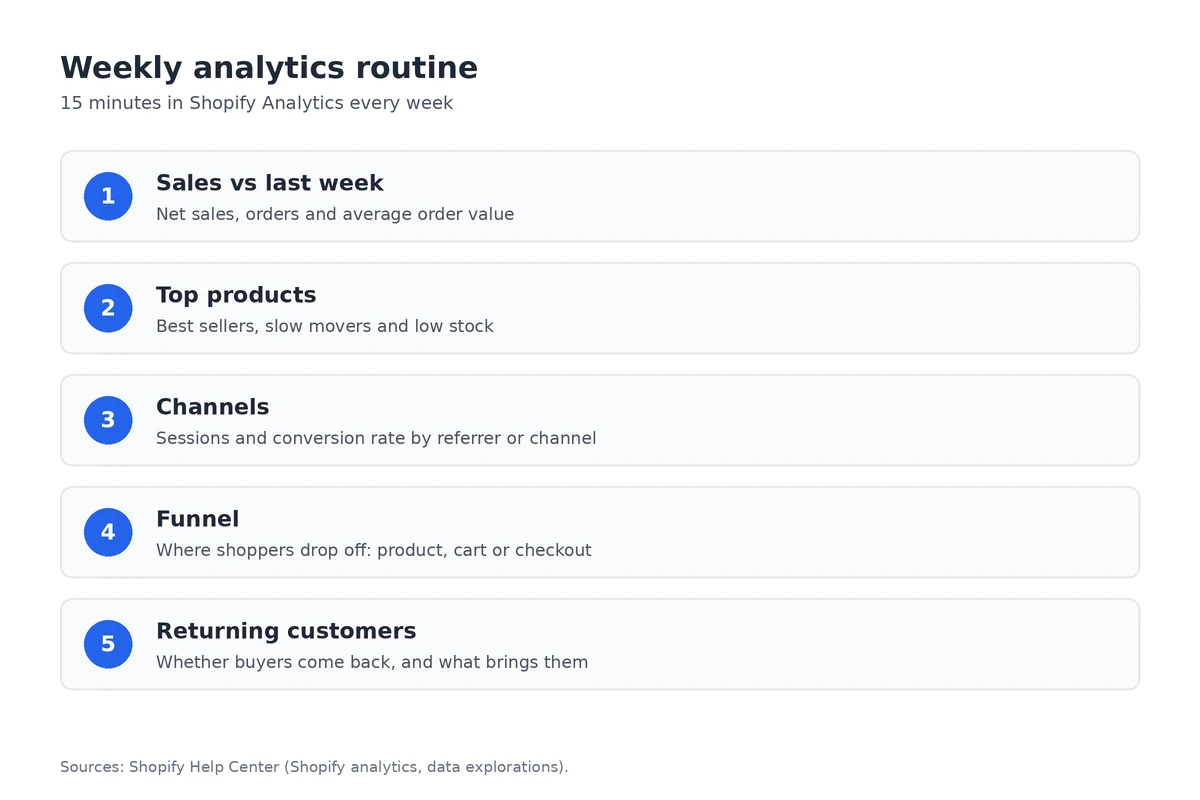
- Compare net sales, orders and average order value with last week.
- Check top products and anything selling out; see our inventory guide.
- Look at sessions and conversion rate by channel to decide where to spend next week.
- If you serve shoppers in more than one language, compare sales by language or market; see our multilingual store guide.
Frequently asked questions
Which Shopify plans include analytics?
Shopify says the main Analytics features are available on every subscription plan. That includes the dashboard, reports, Live View and custom reports built from data explorations. Advanced adds predicted values for some reports.
Can I build my own reports?
Yes. Go to Analytics > Reports and click New exploration. You can pick metrics and dimensions, write a ShopifyQL query, or describe the report to Sidekick, then save it as a custom report.
How do I connect Google Analytics 4?
Install the Google & YouTube app, open it under Sales channels, and use the Google Analytics 4 setup to connect an existing property or create one. You don't need a Merchant Center account for GA4 only.
Why don't Shopify and GA4 numbers match?
They count sessions and attribute sales differently, and GA4 depends on browser tracking and consent. Use Shopify reports for orders and sales, and GA4 for traffic and behaviour trends.
Want to see the reports for yourself? A Shopify trial gives you the Analytics dashboard and reports, so you can learn them before your first sale.
References
Rules, features and fees change, so check the live page before you act on anything here.
- Shopify analytics, Shopify Help Center. Accessed 24 October 2026.
- Create a new data exploration, Shopify Help Center. Accessed 24 October 2026.
- Grow plan, Shopify Help Center. Accessed 24 October 2026.
- Advanced plan, Shopify Help Center. Accessed 24 October 2026.
- Shopify pricing, Shopify. Accessed 24 October 2026.
- Setting up Google Analytics 4, Shopify Help Center. Accessed 24 October 2026.
- Set up the Google & YouTube channel, Shopify Help Center. Accessed 24 October 2026.
- Shopify: Set up your Google tag, Google Analytics Help. Accessed 24 October 2026.
- Migrate your Google tags with the Google & YouTube app on Shopify, Google Analytics Help. Accessed 24 October 2026.