· Giraffe
Multilingual Shopify stores in Singapore
Most Singapore shoppers are comfortable in English, but not all of them shop in it by choice. If your customers include older shoppers, Chinese-speaking families or tourists, a second language can build trust. This guide covers when it's worth it, how Shopify handles languages, auto-translation limits and the SEO side.
Is a second language worth it?
In the 2020 Census, English was the language most often spoken at home by 48.3% of residents aged 5 and over, followed by Mandarin at 29.9%, Chinese dialects at 8.7%, Malay at 9.2% and Tamil at 2.5% (SingStat infographic; executive summary). Over 80% of residents who mainly speak English at home also speak another language there.
So English should stay your primary language. A Chinese (Simplified) version is the most common add-on, especially for food, health, gifts and products aimed at parents and grandparents. If you sell to Malaysia or China too, a translation serves both. Check your analytics first; see our Shopify analytics guide.
How Shopify handles languages
Shopify's localization page says:
- Basic, Grow and Advanced stores can sell in up to 20 languages; Plus up to 30.
- Add languages under Settings > Languages, then publish them.
- Untranslated content falls back to your primary language.
- Once translated, customers can browse, check out and receive notifications in their language.
- Free Shopify themes support multiple languages; custom themes may need changes.
Translate & Adapt and auto-translation
Shopify's free Translate & Adapt app installs when you add a language (Shopify). It has a side-by-side editor for manual translations in any published language.
Auto-translation depends on where your store is based. The automatic translation page and changelog say a set of European countries get up to 8 languages and weekly Auto-sync. Other countries, including Singapore, get up to 2 auto-translated languages in addition to the default, and no Auto-sync:
- Click Auto-translate again after you add or change products; new content isn't translated on its own.
- Once you auto-translate a language you can't swap it for another, and removing the language doesn't reset the limit.
- Manual edits aren't overwritten.
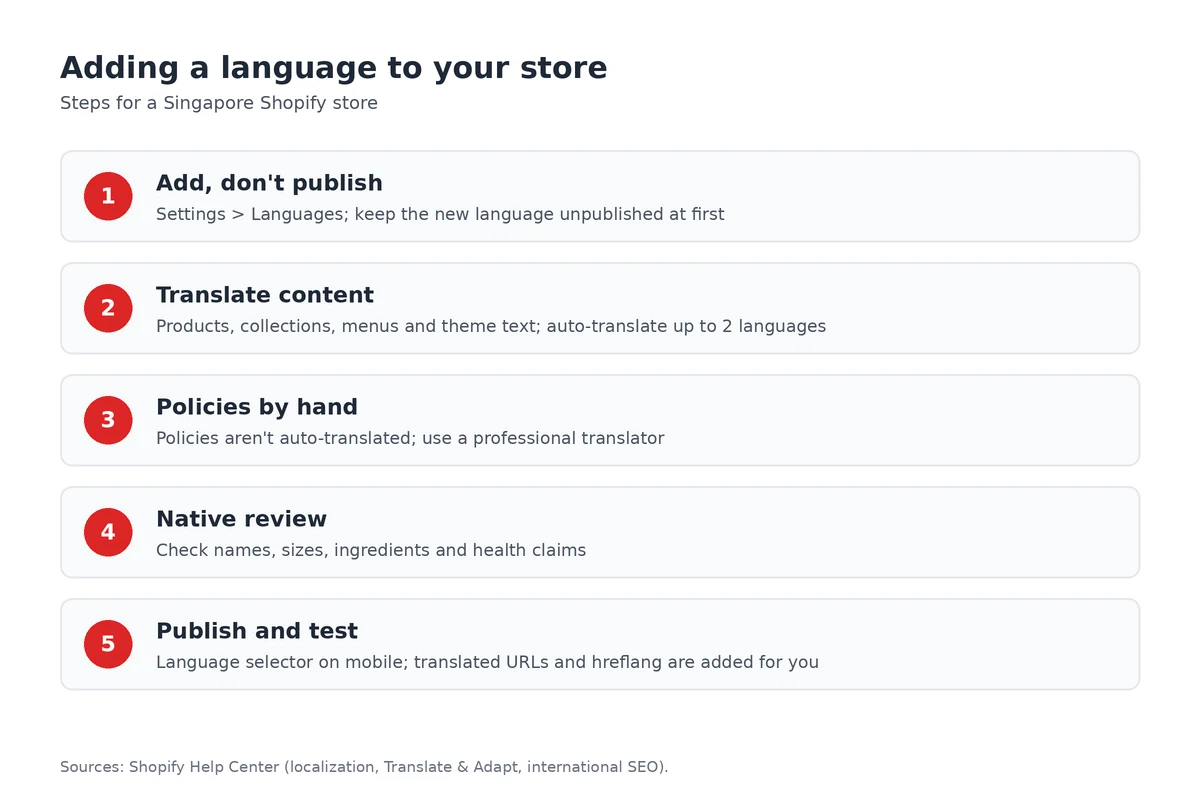
- Policies aren't auto-translated. Translate them manually, ideally with a professional. See our store policies guide.
Machine translation is a draft. Have a fluent speaker check product names, sizes, ingredients and anything health-related.
URLs and SEO
Publishing a language creates its own URLs with a language code, for example yourstore.sg/zh-cn. Shopify adds hreflang tags automatically and includes published languages in the sitemap (Shopify; International SEO). Shopify recommends subfolders for most stores because they share your main domain's authority. Its developer docs warn that adding your own hreflang tags on top of the automatic ones can cause conflicts. Translate URL slugs and SEO titles too; see our local SEO guide.
Launch checklist
- Add the language in Settings > Languages, but don't publish yet.
- Translate (or auto-translate) products, collections, navigation and theme text.
- Manually translate policies and the checkout and notification wording you care about.
- Have a fluent speaker review it, then publish and test the language selector on mobile.
Frequently asked questions
How many languages can a Shopify store have?
Up to 20 languages on Basic, Grow and Advanced, and up to 30 on Shopify Plus. Content you haven't translated shows in your primary language.
Is Translate & Adapt free?
Yes. It's Shopify's free app. You can add manual translations for any published language, and for stores in Singapore, Shopify can auto-translate up to 2 languages in addition to the default.
Can Shopify translate my refund and privacy policies?
No. Policies can't be translated automatically. Translate them manually, ideally with a professional translator, so the legal meaning stays accurate.
Do translated pages help SEO?
They can. Each published language gets its own URLs, such as /zh-cn, Shopify adds hreflang tags automatically, and published languages are included in the sitemap. Don't add your own hreflang tags on top.
Planning an English and Chinese storefront? Start a Shopify trial, add a language under Settings > Languages and preview it before you publish.
References
Rules, features and fees change, so check the live page before you act on anything here.
- Localization and translation, Shopify Help Center. Accessed 24 October 2026.
- Add language translations using the Translate & Adapt app, Shopify Help Center. Accessed 24 October 2026.
- Translating content automatically using the Translate & Adapt app, Shopify Help Center. Accessed 24 October 2026.
- Shopify Translate & Adapt, Shopify App Store. Accessed 24 October 2026.
- Translate & Adapt: Auto-sync translations for up to 8 languages, Shopify Changelog. Accessed 24 October 2026.
- International SEO for markets, Shopify Help Center. Accessed 24 October 2026.
- Use hreflang tags in your theme, Shopify Developers. Accessed 24 October 2026.
- Census of Population 2020: Literacy and home language, Singapore Department of Statistics. Accessed 24 October 2026.
- Census of Population 2020, Statistical Release 1: Executive summary, Singapore Department of Statistics. Accessed 24 October 2026.