· Giraffe
Bookkeeping for a Singapore Shopify store

Shopify is very good at taking money. It is less interested in what happens next: matching payouts to your bank, keeping receipts for five years and filing with IRAS on time. That part is yours. This guide covers what Singapore law asks you to keep, which tax returns a sole proprietor or a company files, how to get clean numbers out of Shopify, and when accounting software earns its keep.
This is general information, not tax or accounting advice. Your obligations depend on your business structure and facts, so check the IRAS and ACRA pages linked below, or ask an accountant, before you act.
What Singapore asks you to keep
The short version is five years, with proof.
- Sole proprietors and partners must keep full and accurate records of business transactions from the start, supported by invoices, receipts, vouchers and other documents, and keep them for 5 years. IRAS says estimates are not acceptable.
- Companies must keep records that explain their transactions and financial position. Section 199 of the Companies Act sets the minimum at 5 years from the end of the financial year the records relate to, and IRAS asks companies to keep source documents, accounting records and bank statements for at least 5 years from the relevant Year of Assessment.
- If you close the business, IRAS says records still need to be kept for 5 years after the company is struck off or wound up, or after a sole proprietorship or partnership ends.
IRAS can disallow expenses, estimate your income and impose penalties of up to $5,000 if records aren't kept. It also specifically mentions income received through PayNow and PayLah, so payments that skip Shopify checkout still need recording.
For a Shopify store, the records usually mean: order and refund exports, payout reports, payment gateway statements (Shopify Payments, HitPay, PayPal and so on), your Shopify bills and app charges, supplier invoices, shipping costs and your bank statements.
The small-business shortcut
IRAS offers Simplified Record Keeping to sole proprietorships, partnerships and self-employed people that meet all of these conditions: revenue of $200,000 or less in each of the past two financial years, assets under $100,000 at the end of the latest financial year, not in investment holding or property development, and not GST-registered. If you qualify, you can keep registers and listings instead of every source receipt. You don't need to tell IRAS you're using it, but IRAS warns that switching back to full record keeping later can be costly, so only use it if you expect to stay small. Companies don't qualify.
What you file, and when
Which returns you file depends on how you registered with ACRA. Our ACRA registration guide covers the choice itself.
Sole proprietors and partners
Your store's profit goes on your personal income tax return (Form B or B1) under trade, business, profession or vocation. IRAS's e-filing window runs from 1 March to 18 April. You don't submit full accounts. Instead you prepare a short statement from them:
- a 2-line statement (revenue, adjusted profit or loss) if revenue is $200,000 or less
- a 4-line statement (revenue, gross profit, allowable deductions, adjusted profit or loss) above that
Above $500,000 in revenue, IRAS asks you to upload a certified statement of accounts with the return. For a small store, IRAS also offers a free Record Keeping Assistant spreadsheet on its self-employed guide page.
Companies
A company files two corporate income tax returns each year:
- Estimated Chargeable Income (ECI), within 3 months of the financial year end. You can skip it if revenue is $5 million or less and the ECI is nil; you don't need to tell IRAS.
- Form C-S, Form C-S (Lite) or Form C, by 30 November. Form C-S is for Singapore-incorporated companies with revenue of $5 million or less that meet IRAS's other conditions. Form C-S (Lite), with only six fields, is an option at $200,000 or less. Neither needs financial statements attached, but IRAS says you should prepare them and be ready to submit them on request.
Directors also have ACRA duties, such as preparing financial statements unless exempt and filing annual returns. ACRA's directors' duties page is the place to check.
If you're GST-registered
GST returns add a quarterly (or monthly) cycle on top of everything above. Our GST guide for Shopify covers registration and how to set up tax in Shopify. The bookkeeping point here is that GST-registered businesses can't use Simplified Record Keeping, and InvoiceNow is on its way (more on that below).
Getting clean numbers out of Shopify
Most bookkeeping confusion with Shopify comes from one fact: sales and payouts are different numbers. Shopify's sales reports count the value of orders when they're placed, while payments reports count money actually captured. Your bank only sees payouts, which are payments minus fees, refunds, chargebacks and any reserve, grouped by settlement date. Shopify also notes that sales reports don't include chargebacks.
The reports that matter for your books:
- Finance reports (under Analytics > Reports) give sales, payments, taxes and gross profit for a period. The Finance Summary pulls them together.
- The Payouts page (Finance > Payouts) lists each payout. You can export the transactions for a single payout, which is what you need to match one bank deposit.
- The Shopify Payments activity report (Finance > Documents) shows starting balance, earnings, fees, payouts and ending balance for a date range, as a PDF. Shopify suggests it for month-end reconciliation and for handing to your accountant, and says plainly that it isn't a revenue statement.
- Your Shopify bills (Settings > Billing) list your subscription, app and other charges. You can export a bill as a PDF, or several bills as a CSV, for your expense records.
Our Shopify Payments payouts guide explains settlement timing, and Shopify analytics for Singapore merchants covers the reports side in more depth. If you also take PayNow through HitPay or another provider, that money arrives on its own schedule, so reconcile it from that provider's reports.
Spreadsheet or accounting software?
Nothing in the rules says you need software. What you need is complete records you can explain. A tidy spreadsheet plus a folder of monthly exports is fine for a small, non-GST-registered store. Software starts to pay off when payouts, fees and refunds pile up faster than you can match them by hand, or once you're GST-registered.
IRAS encourages companies to use software on its Accounting Software Register Plus (ASR+) list. Two common choices that connect directly to Shopify:
- Xero. Xero's Shopify integration syncs sales either as daily summaries or as individual orders, and matches Shopify Payments and other gateway payouts to your bank feed. Its Shopify App Store listing says it can bring in up to 90 days of history. One catch for Singapore: Xero's own Singapore page says the integration doesn't account for sales tax in Singapore, and that tax data needs to be downloaded from Shopify for reporting and filing.
- QuickBooks Online. Intuit's Shopify connector, according to its App Store listing, syncs orders, payouts, fees and tax mappings, and is included with a QuickBooks subscription.
Prices change, so check each vendor's own pricing page rather than relying on a number here. Whichever you pick, test the sync on a single month and compare it against Shopify's payout report before you trust it.
InvoiceNow is coming for GST-registered stores
InvoiceNow is Singapore's nationwide e-invoicing network, built on the Peppol standard and introduced by IMDA. IRAS is phasing in a requirement for GST-registered businesses to send invoice data to IRAS through InvoiceNow-ready solutions:
- From 1 November 2025: companies that register for GST voluntarily within 6 months of incorporation.
- From 1 April 2026: all businesses applying for voluntary GST registration.
- From 1 April 2028: new compulsory GST registrants, and existing GST-registered businesses with total annual supplies of $200,000 or less.
- 1 April 2029 to 1 April 2031: the remaining GST-registered businesses, in bands by annual supplies.
IRAS says it began notifying businesses registered for GST before 2026 of their implementation date from mid-2026, and has a calculator on its InvoiceNow page so you can check yours. If you're planning to register for GST, budget for an InvoiceNow-ready accounting tool and a Peppol ID as part of the job. If you're not GST-registered, none of this applies yet.
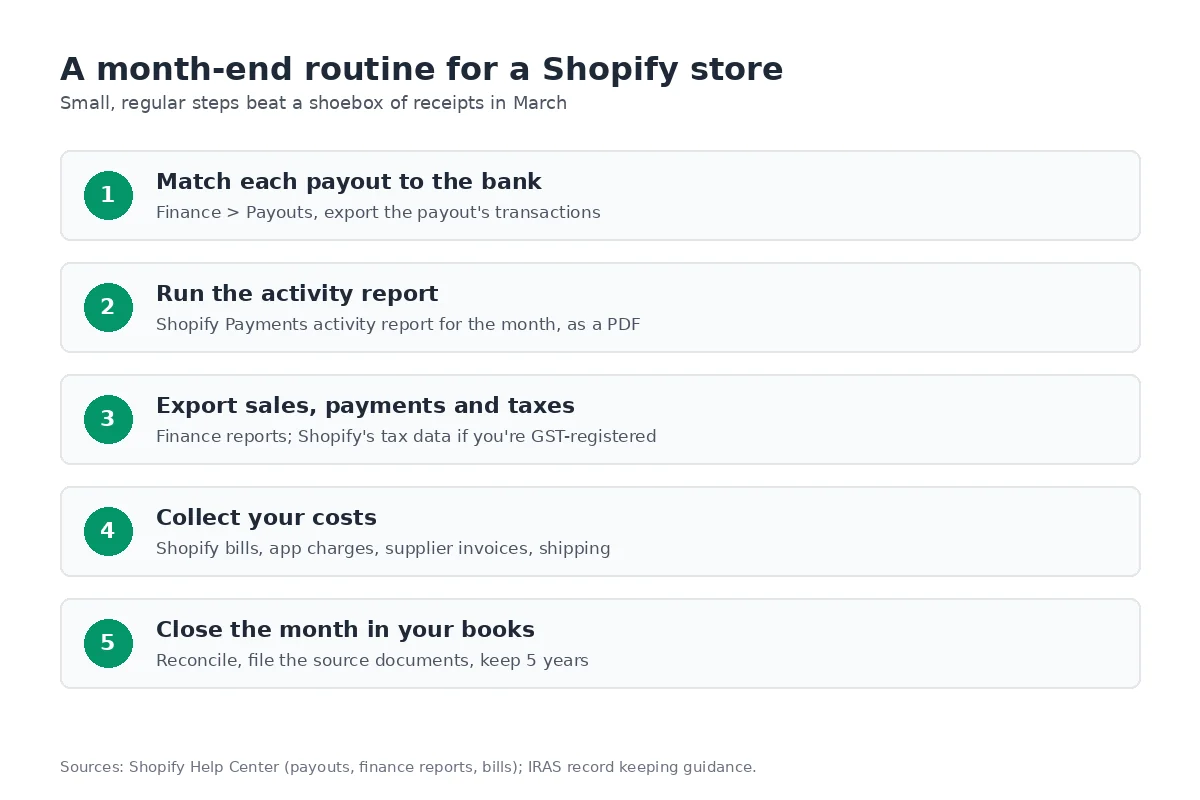
A month-end routine that keeps March calm
- Match each payout on the Payouts page to a deposit in your bank account.
- Save the Shopify Payments activity report for the month as a PDF.
- Export the finance reports for sales, payments and, if you're GST-registered, taxes.
- Collect your costs: Shopify bills, app charges, supplier invoices, shipping and other payment providers' statements.
- Close the month in your spreadsheet or software, and file every source document somewhere you'll still find it in five years.
Twelve of these and your annual return is mostly copying numbers. Good books also show which products actually make money; our pricing and margins guide covers that next step.
Frequently asked questions
How long do I need to keep records for a Singapore Shopify store?
Five years. IRAS asks sole proprietors, partners and companies to keep accounting records and supporting documents such as invoices and receipts for at least 5 years from the relevant Year of Assessment, and the Companies Act requires companies to keep accounting records for at least 5 years from the end of the financial year they relate to. That includes your Shopify order, payout and billing records.
Do I need accounting software to run a Shopify store in Singapore?
Not by law. The rule is that your records must be complete and backed by source documents. A spreadsheet can work for a very small store, and IRAS has a Simplified Record Keeping option for small sole proprietorships and partnerships that meet its conditions. IRAS encourages companies to use software on its Accounting Software Register Plus, and software becomes more useful once you are GST-registered, because of the InvoiceNow requirement.
Why don't my Shopify sales match my bank deposits?
Because they measure different things. Shopify's sales reports count orders when they are placed, while payouts are payments minus processing fees, refunds, chargebacks and any reserve, grouped by settlement date. Use the Payouts page to match each bank deposit and the Shopify Payments activity report for a month-level view. Shopify says the activity report is not a revenue statement.
Does the Xero Shopify integration handle GST in Singapore?
Not according to Xero. Xero's Singapore page for the integration says it imports a summary of sales and purchases but does not account for sales tax in Singapore, and that tax data needs to be downloaded from Shopify for reporting and filing. If you are GST-registered, export Shopify's tax data separately and check your mapping with your accountant.
What is InvoiceNow and does it affect my Shopify store?
InvoiceNow is Singapore's Peppol-based e-invoicing network. IRAS is phasing in a requirement for GST-registered businesses to send invoice data to IRAS through InvoiceNow-ready solutions. It already applies to new voluntary GST registrants from 1 April 2026, and from 1 April 2028 it covers new compulsory registrants and existing GST-registered businesses with annual supplies of 200,000 dollars or less, with larger businesses following up to 1 April 2031. If you are not GST-registered, it does not apply to you yet.
If you're still choosing a platform, a Shopify trial lets you look at the finance reports and payout exports before you commit, so you know what your bookkeeping will look like.
References
Rules, features and fees change, so check the live page before you act on anything here.
- Keeping proper records and accounts, IRAS. Accessed 27 October 2026.
- Filing responsibilities of self-employed individuals, IRAS. Accessed 27 October 2026.
- Basic guide for self-employed individuals, IRAS. Accessed 27 October 2026.
- e-Tax Guide: Simplified Record Keeping for small businesses (PDF), IRAS. Accessed 27 October 2026.
- Getting individuals to comply, IRAS. Accessed 27 October 2026.
- Record keeping requirements (companies), IRAS. Accessed 27 October 2026.
- Basic guide to Corporate Income Tax for companies, IRAS. Accessed 27 October 2026.
- Estimated Chargeable Income (ECI) filing, IRAS. Accessed 27 October 2026.
- Overview of Form C-S / Form C-S (Lite) / Form C, IRAS. Accessed 27 October 2026.
- Guidance on filing Form C-S / Form C-S (Lite) / Form C, IRAS. Accessed 27 October 2026.
- Due dates, IRAS. Accessed 27 October 2026.
- GST InvoiceNow Requirement, IRAS. Accessed 27 October 2026.
- Committee of Supply 2026: Extension of GST InvoiceNow Requirement to all GST-registered businesses by April 2031, IRAS. Accessed 27 October 2026.
- Guide to completing GST registration form, IRAS. Accessed 27 October 2026.
- ASR+ listing, IRAS. Accessed 27 October 2026.
- Singapore country profile, OpenPeppol. Accessed 27 October 2026.
- Companies Act 1967, section 199, Singapore Statutes Online (AGC). Accessed 27 October 2026.
- Company directors' duties and key obligations, ACRA. Accessed 27 October 2026.
- Finance reports, Shopify Help Center. Accessed 27 October 2026.
- Sales reports, Shopify Help Center. Accessed 27 October 2026.
- Viewing and exporting your Shopify Payments payout details, Shopify Help Center. Accessed 27 October 2026.
- Shopify Payments activity report, Shopify Help Center. Accessed 27 October 2026.
- Exporting your Shopify bills, Shopify Help Center. Accessed 27 October 2026.
- Viewing your Shopify bills, Shopify Help Center. Accessed 27 October 2026.
- Integrate Shopify with Xero accounting software, Xero Singapore. Accessed 27 October 2026.
- Xero, Shopify App Store. Accessed 27 October 2026.
- QuickBooks Online, Shopify App Store. Accessed 27 October 2026.