· Giraffe
Collections and navigation for Singapore stores

A clear set of collections and menus is how shoppers browse when they don't know the product name. On mobile, which most Singapore shoppers use, a messy menu loses sales. This guide covers creating collections, putting them in navigation, adding filters and writing collection pages that search engines can understand.
What a collection is
A collection is a group of products shown as its own page. Shopify's collections overview and create-collection page describe a newer model that can combine:
- automatic rules (for example product type, tag or vendor);
- products you pick by hand;
- automatic or manual exclusions.
Older stores may still see separate Manual and Smart collections. Use automatic rules for large catalogues; use manual picks for "New arrivals", "Gifts under $50" or a limited drop.
How to structure collections for Singapore
- Start with how customers shop: category (skincare, snacks), use case (office lunch, CNY gifts), or audience.
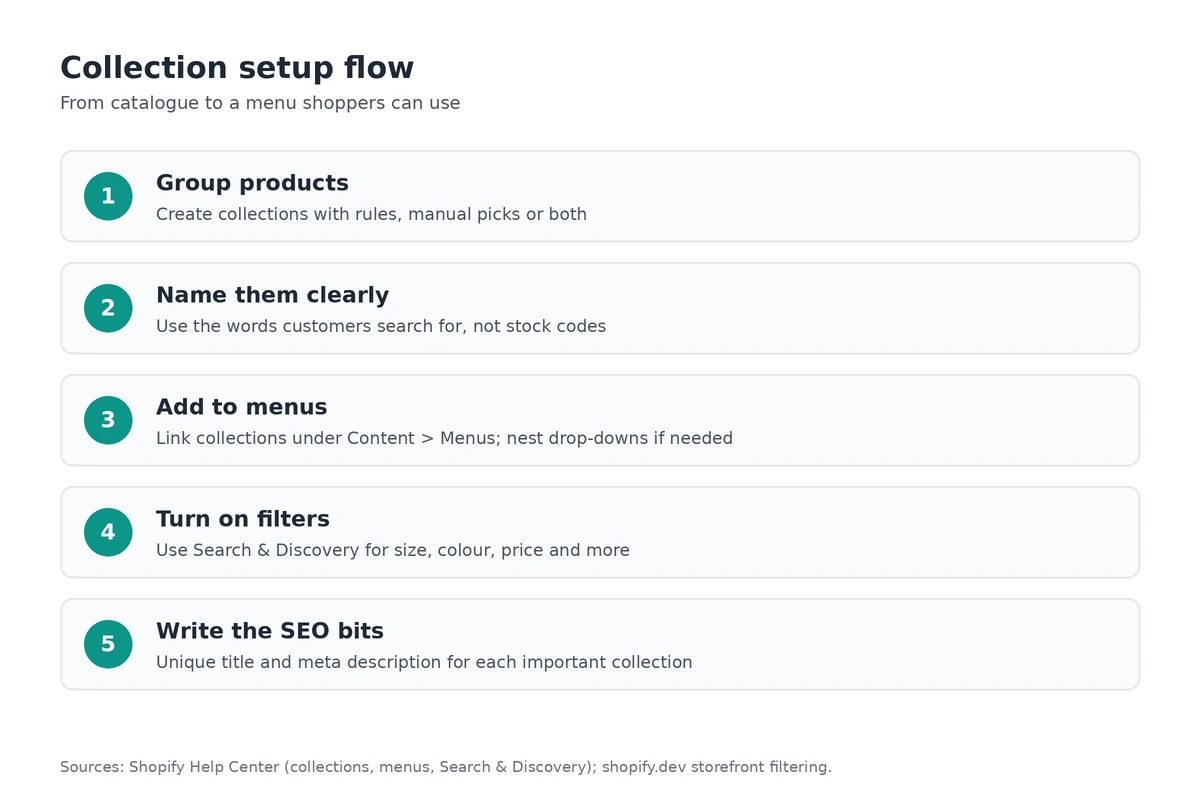
- Keep top-level names short and familiar. Prefer "Women's tops" over internal stock codes.
- Don't duplicate the same products across dozens of near-identical collections; it confuses shoppers and search.
- Sort each collection thoughtfully (best selling, newest, price) so the first screen looks intentional.
Strong product pages still do the selling once someone clicks through; see our product pages guide.
Menus and navigation
After you create a collection, add it under Content > Menus so it appears in the header or footer (Shopify). Shopify's menus guide covers nesting items into drop-downs. Practical tips:
- Limit the main menu to a handful of clear items on mobile.
- Link "All products" only if the catalogue is small; large stores need categories.
- Select the collection from the list rather than pasting a URL, so links don't break if the handle changes.
- Put shipping, returns and contact in the footer, not the main browse menu; see our store policies guide.
Storefront filters
Filters let shoppers narrow results by availability, price, tags, product type, vendor, variant options or metafields (Shopify Developers). Set them up in the free Search & Discovery app. Your theme must support storefront filtering for them to show. Keep filter labels plain (Size, Colour, Price) and make sure variant options are filled in consistently on products.
Collection SEO
Edit each important collection's search engine listing title and meta description. Shopify's SEO keywords page and category SEO guide suggest keeping titles under about 60 characters and writing natural descriptions. Add a short introduction on the collection page itself when the theme allows it. For the rest of on-page SEO, see our local SEO guide.
Collections that feed marketing
Named collections make email and ads easier: "CNY gifts", "Under $30" or "In stock this week" can be linked from a campaign. See our email marketing guide and Google Shopping guide.
Frequently asked questions
What's the difference between manual and automatic collections?
Shopify is moving to a single collections model that can mix automatic rules, manually added products and exclusions. Older stores may still see separate Manual and Smart collection types. Use rules for things like tags or product type, and manual picks for curated drops.
How do customers find a collection?
Create the collection, make sure it's available on the Online Store channel, then add a link under Content > Menus. You can nest collections in drop-down menus.
What are storefront filters?
Filters let shoppers narrow a collection or search by availability, price, tags, product type, vendor, variant options or metafields. Set them up in the Shopify Search & Discovery app on a compatible theme.
Do collection pages matter for SEO?
Yes. Give each important collection a unique title and meta description in its search engine listing. Keep titles under about 60 characters and write for how Singapore shoppers search.
Building out your catalogue? A Shopify trial lets you create collections, add them to menus and preview filters in your theme before launch.
References
Rules, features and fees change, so check the live page before you act on anything here.
- Collections, Shopify Help Center. Accessed 23 October 2026.
- Creating collections and adding products, Shopify Help Center. Accessed 23 October 2026.
- Adding menu links for your collections, Shopify Help Center. Accessed 23 October 2026.
- Add, remove, or edit menu items in your online store, Shopify Help Center. Accessed 23 October 2026.
- Adding filters with Shopify Search & Discovery, Shopify Help Center. Accessed 23 October 2026.
- Storefront filtering, Shopify Developers. Accessed 23 October 2026.
- Adding keywords for SEO to your Shopify store, Shopify Help Center. Accessed 23 October 2026.
- Ecommerce category page SEO: how to optimize Shopify, Shopify Blog. Accessed 23 October 2026.