· Giraffe
Product pages that sell for Singapore stores

The product page is where a visitor decides to buy or leave. Good photos, a clear description, the right options and honest pricing do most of the work. This guide covers Shopify's media specs, writing descriptions, variants and metafields, Singapore's rules on misleading claims and GST-inclusive prices, and making product pages easy to find.
This is general information, not legal advice. It summarises Shopify, IRAS and Singapore legislation sources as of the date above.
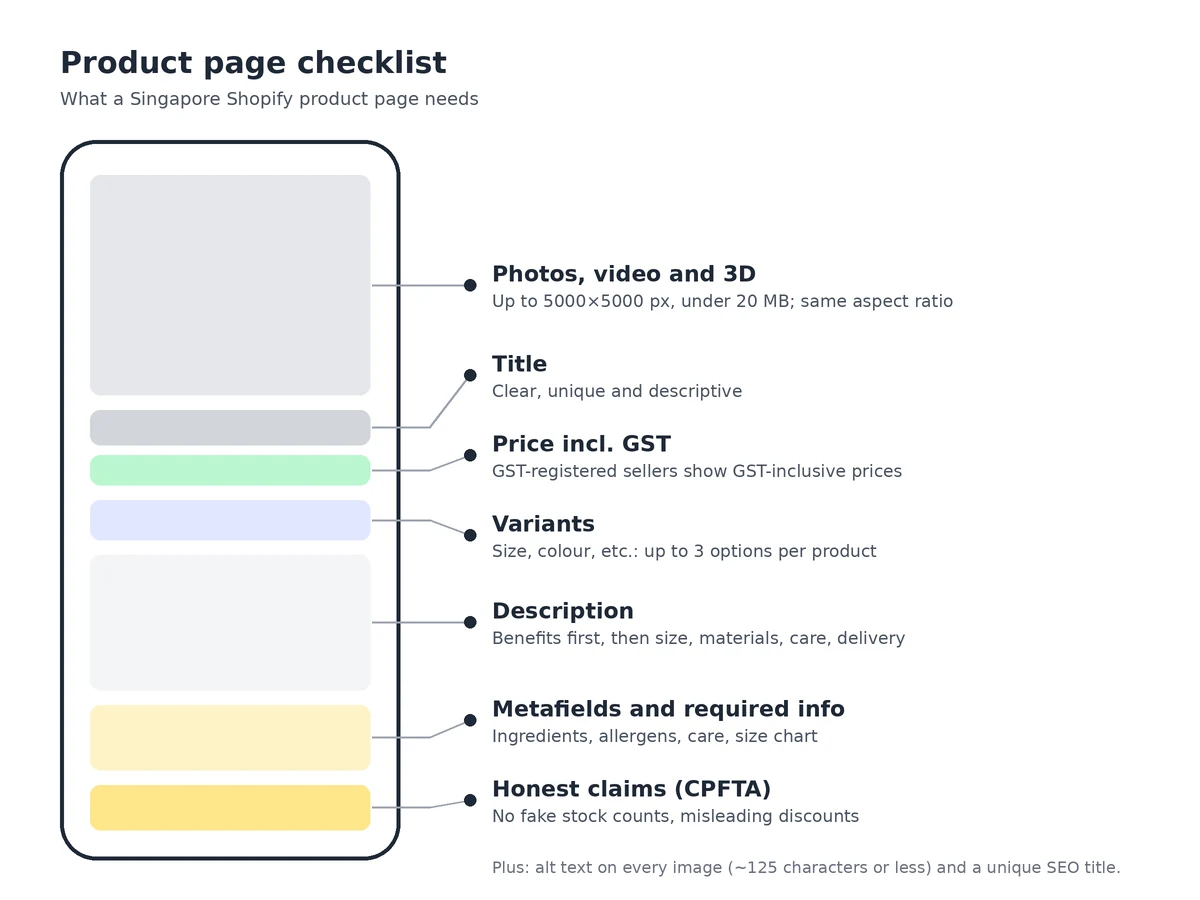
Photos: sizes and formats
Shopify's media types page says:
- Images can be up to 5000 x 5000 px (25 megapixels) and must be under 20 MB.
- For square images, 2048 x 2048 px usually displays best.
- PNG and JPEG work best; WebP, GIF, HEIC and others are accepted. Shopify automatically serves the best format each browser supports.
- Use a consistent aspect ratio for main images so collection pages look even.
Show the product from several angles, in use, and with something that shows scale. For clothing, add a photo of the fabric close up and a model with their size noted. Keep file sizes sensible; our store speed guide explains why large images slow pages down.
Video and 3D
You can upload videos up to 10 minutes, 1 GB and 4K, in MP4, MOV or WebM, or embed YouTube and Vimeo links. 3D models can be GLB or USDZ up to 500 MB, and Shopify optimises files over 15 MB. According to Shopify's adding media page, videos and 3D models need a theme that supports them and can't be used as variant images. A short video showing texture, fit or how something works often answers questions photos can't.
Alt text
Alt text describes an image for screen readers and shows when an image fails to load. Shopify's alt text guide and media editor page recommend keeping it brief and descriptive, around 125 characters or less (maximum 512). The media editor can suggest alt text; check suggestions before accepting them. Write "Navy linen shirt, front view" rather than a list of keywords.
Writing product descriptions
- Lead with what the product does for the customer, then the details.
- Answer the questions you get asked: size, materials, care, what's in the box, delivery time.
- Use short paragraphs and bullet points; most Singapore shoppers browse on mobile.
- Write your own text instead of copying the supplier's, which may be on hundreds of other sites.
- Only make claims you can back up, especially about health, safety or origin.
Variants and metafields
Variants let one product come in different options, such as size or colour, each with its own price, SKU, stock and image. Shopify allows up to three options and 2,048 variants per product. Use them instead of separate products so customers can switch options on one page.
Metafields store information Shopify doesn't have a standard field for: ingredients, care instructions, dimensions, a size chart or a warranty. Shopify's product media page notes that Online Store 2.0 themes can show metafield content through the theme editor, so you can add consistent sections across products without code. See our theme guide.
Misleading claims: the CPFTA
Section 4 of the CPFTA makes misleading conduct an unfair practice, and its Second Schedule lists examples that apply directly to product pages:
- Saying goods are available in particular quantities, at a particular price or for a particular time when you know that isn't so, unless the limitation is clearly stated. Fake "only 3 left" counters fall here.
- Saying a discount is available for a stated period when you know it will continue for substantially longer. Countdown timers that reset are a risk.
- Saying a discount is for a reason that isn't true.
- Omitting a material fact or hiding it in small print.
For crossed-out "compare at" prices, use a price you've genuinely charged. The CCCS enforces the Act, and consumers can complain to CASE.
GST-inclusive prices
IRAS's price display rules say GST-registered businesses must show GST-inclusive prices to the public, including on websites. "$100 + GST" on its own isn't acceptable; "$109" or "$109 (inclusive of GST)" is. Set this up once in Shopify's tax settings; our GST guide explains how.
Regulated products
Food, supplements, cosmetics and health products have extra labelling and listing rules. Show required information, such as ingredients, allergens or product notification details, on the page. See our guides to selling food online and selling cosmetics and health products.
SEO for product pages
- Write a unique page title and meta description for each product in the search engine listing section.
- Use a short, readable URL handle.
- Add alt text to every image.
- Keep product data accurate, because the same data feeds Google Shopping, which, according to Google's product data specification, must match the price and details on the page.
See our local SEO guide and Google Shopping guide. For review and size-chart apps, keep the list short; see Shopify apps a new Singapore store actually needs.
Frequently asked questions
What size should Shopify product images be?
Shopify accepts images up to 5000 x 5000 px (25 megapixels) and under 20 MB, and says 2048 x 2048 px usually displays best for square images. Use the same aspect ratio for main images so collection pages line up.
How long should alt text be?
Shopify recommends brief, descriptive alt text of 125 characters or less, with a maximum of 512. Describe what's in the image, such as the product, colour and angle, rather than repeating keywords.
Can I say 'only 3 left' or show a crossed-out price?
Only if it's true. The CPFTA's Second Schedule lists representing that goods are available in particular quantities or at a particular price when you know it isn't so, and claiming a discount will last for a stated time when it will continue for much longer, as unfair practices.
Do product prices need to include GST?
If you're GST-registered, yes. IRAS requires prices shown to the public, including website prices, to be GST-inclusive. Showing '$100 + GST' alone isn't acceptable.
What are metafields used for on product pages?
Metafields store extra product information that Shopify doesn't have a standard field for, such as ingredients, care instructions, dimensions or a size chart. Online Store 2.0 themes can show them through the theme editor without code.
Building your first product pages? A Shopify trial lets you upload media, set up variants and metafields, and preview pages in your theme before you launch.
References
Rules, features and fees change, so check the live page before you act on anything here.
- Product media, Shopify Help Center. Accessed 20 October 2026.
- Product media types, Shopify Help Center. Accessed 20 October 2026.
- Adding alt text to media, Shopify Help Center. Accessed 20 October 2026.
- Adding product media, Shopify Help Center. Accessed 20 October 2026.
- Using the media editor, Shopify Help Center. Accessed 20 October 2026.
- Adding variants, Shopify Help Center. Accessed 20 October 2026.
- Metafields, Shopify Help Center. Accessed 20 October 2026.
- Consumer Protection (Fair Trading) Act 2003, Second Schedule, Singapore Statutes Online. Accessed 20 October 2026.
- Consumer Protection (Fair Trading) Act 2003, section 4, Singapore Statutes Online. Accessed 20 October 2026.
- Consumer protection FAQs, Competition and Consumer Commission of Singapore. Accessed 20 October 2026.
- Displaying and quoting prices, Inland Revenue Authority of Singapore. Accessed 20 October 2026.
- Product data specification, Google Merchant Center Help. Accessed 20 October 2026.