· Giraffe
Shopify store speed and Core Web Vitals

A slow store loses shoppers before they see a product, and most Singapore shoppers are on their phones. Shopify gives you a built-in dashboard that measures real visitors against Google's Core Web Vitals. This guide explains what the numbers mean and the fixes that make the biggest difference.
The three Core Web Vitals
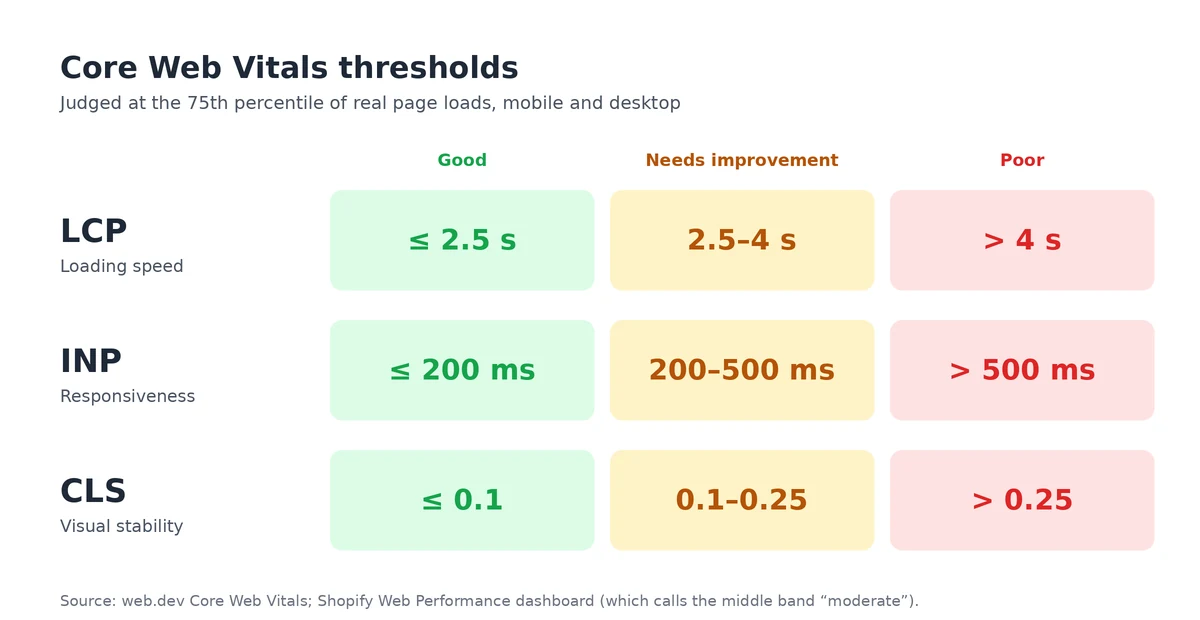
Google's web.dev defines three metrics, and Shopify's dashboard uses the same thresholds:
| Metric | Measures | Good | Poor |
|---|---|---|---|
| Largest Contentful Paint (LCP) | How fast the main content appears | 2.5 s or less | Over 4 s |
| Interaction to Next Paint (INP) | How fast the page responds to taps and clicks | 200 ms or less | Over 500 ms |
| Cumulative Layout Shift (CLS) | How much content jumps around while loading | 0.1 or less | 0.25 or more |
Scores are judged at the 75th percentile: if at least 75% of visits meet the "good" level, the metric is good (web.dev). Shopify calls the middle band "moderate"; Google calls it "needs improvement".
Shopify's Web Performance dashboard
- Find it in Analytics > Reports > Web Performance. You need the Reports staff permission.
- It uses real visitor data from the past 28 days, not a lab test, and lets you filter by mobile or desktop.
- It shows events such as app installs and theme changes alongside the data, so you can see what affected speed.
- Changes take time to show, and new or password-protected stores may have no data.
The dashboard replaced Shopify's old speed score in 2024, as described on Shopify's performance blog. The reports let you drill into page types and URLs to find which pages are slow.
Fixing slow loading (LCP)
On most product and home pages, the largest element is a hero image or main product photo.
- Don't lazy-load the first image. Shopify's theme performance guidance says the LCP image should load early; lazy-load images further down the page instead.
- Upload sensible image sizes. Shopify creates resized versions and serves the best format each browser supports (product media types), but huge originals and full-width sliders still cost time.
- Avoid slideshows at the top of the page. One strong image usually loads faster than several.
Fixing slow responses (INP)
Shopify's improvement guide says poor INP is most likely caused by too much JavaScript from the theme, apps or third-party and tag manager code.
- Remove apps you don't use, then check the theme code for scripts they left behind.
- Review tracking pixels and tag manager tags; keep the ones you act on.
- Be wary of chat widgets, pop-ups and review carousels that load on every page.
For deciding which apps are worth keeping, see Shopify apps a new Singapore store actually needs.
Fixing layout shifts (CLS)
- Give images and video set dimensions or aspect ratios so space is reserved.
- Don't insert announcement bars or banners above content after the page loads.
- Keep product images a consistent aspect ratio, as covered in our product pages guide.
Themes and apps
Your theme sets the baseline. Shopify's developer guidance requires Theme Store themes to meet a minimum Lighthouse performance score, so a current Theme Store theme is a reasonable start; heavily customised or very old themes are common sources of problems. See our theme guide.
Shopify's performance guidance also warns about apps that claim to improve speed by manipulating test results rather than real performance. Judge any change by the dashboard's real user data.
Speed and search
According to web.dev, Core Web Vitals are surfaced across Google's tools. Speed won't make up for weak content, but a fast, stable page helps both shoppers and search. See our local SEO guide for the rest of the picture.
A simple routine
- Check the dashboard monthly, filtered to mobile.
- After installing an app or changing the theme, note the date and check again a few weeks later.
- Fix the worst page type first, usually product or home pages.
Frequently asked questions
What are good Core Web Vitals scores?
Google's web.dev guidance says a good experience is LCP of 2.5 seconds or less, INP of 200 milliseconds or less and CLS of 0.1 or less, measured at the 75th percentile of page loads on mobile and desktop.
Where do I see my Shopify store's speed?
In the Web Performance dashboard under Analytics > Reports. It uses real visitor data from the past 28 days and rates LCP, INP and CLS as good, moderate or poor. You need the Reports staff permission.
Why hasn't my score changed after I fixed something?
The dashboard uses real user data over a rolling period, so changes take time to show. New or password-protected stores may not have any data yet.
Do speed-booster apps help?
Be careful. Shopify's theme performance guidance warns about apps that claim to improve performance by manipulating test results rather than real speed. Removing unused apps and scripts usually helps more.
Want a fast starting point? Shopify's free themes are built to its performance guidelines, and a trial lets you check speed in the Web Performance dashboard.
References
Rules, features and fees change, so check the live page before you act on anything here.
- Web Performance dashboard and reports, Shopify Help Center. Accessed 20 October 2026.
- Web performance reports, Shopify Help Center. Accessed 20 October 2026.
- Improving your online store performance, Shopify Help Center. Accessed 20 October 2026.
- Theme performance best practices, Shopify Developers. Accessed 20 October 2026.
- Shopify's new web performance dashboard with real user insights, Performance @ Shopify. Accessed 20 October 2026.
- Web Vitals, web.dev. Accessed 20 October 2026.
- How the Core Web Vitals metrics thresholds were defined, web.dev. Accessed 20 October 2026.
- Interaction to Next Paint (INP), web.dev. Accessed 20 October 2026.
- Cumulative Layout Shift (CLS), web.dev. Accessed 20 October 2026.
- Product media types, Shopify Help Center. Accessed 20 October 2026.