· Giraffe
Product reviews for Singapore Shopify stores

Reviews from real buyers answer the questions a product page can't. This guide covers choosing a review app, asking for reviews, showing them honestly, getting stars in Google, and Singapore's rules on fake reviews.
This is general information, not legal advice.
Choosing a review app
Shopify's own Product Reviews app was discontinued in 2024, according to Judge.me and REVIEWS.io, which both published migration guides. Stores now use a third-party app; Shopify's blog lists several. When comparing, look for:
- automatic review request emails after delivery;
- photo and video reviews;
- CSV import, so you can bring reviews from another platform or move apps later;
- Product structured data for search;
- a light script, so it doesn't slow pages; see our store speed guide.
For keeping your app list short, see Shopify apps a new Singapore store actually needs.
Asking for reviews
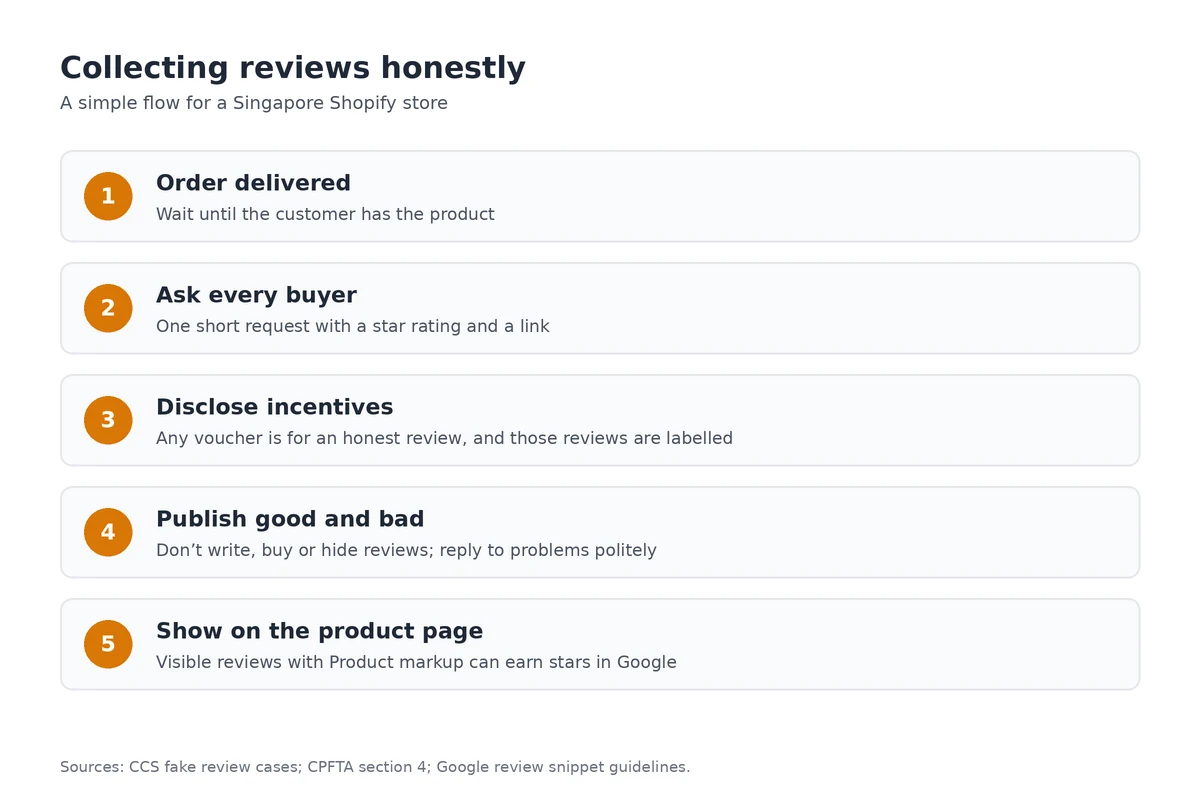
- Send the request after the order arrives, not when it ships. Local deliveries are often quick, so a few days after delivery usually works.
- Keep it short: one link, one question, a star rating.
- Ask every buyer, not just the ones you expect to be happy.
- Follow your marketing consent settings for any follow-ups; see our PDPA guide.
Incentives
Google's review snippet guidelines say reviews written in exchange for money, discounts, vouchers or free products must clearly and prominently disclose the incentive. If you offer a voucher for a review, offer it for any honest review, and label those reviews.
Fake reviews: the CCS is acting
Section 4 of the CPFTA makes misleading conduct an unfair practice. The CCS says posting or buying fake reviews falls under it, because shoppers may think a business or product is better received than it is.
- In 2025 a car detailing business admitted posting fake five-star reviews, some written with AI using real customers' details (CCS).
- The CCS later took action against 45 businesses and a fake review provider that used generative AI and paid posters (CCS). The businesses gave undertakings that included removing fake reviews and publishing a public apology for six months.
- The CCS's fake reviews page names the businesses and invites others involved to come forward voluntarily.
The ASAS also points to truthful presentation as a principle of the Singapore Code of Advertising Practice. In practice: don't write reviews yourself, don't buy them, don't post reviews from staff or family as customers, and don't hide genuine negative reviews.
Showing reviews honestly
- Publish negative reviews too, and reply politely with what you've done to fix the problem.
- Don't edit a customer's words beyond removing personal details or offensive content.
- Only show imported reviews for the same product, and say where they came from.
Stars in Google
Google's review snippet documentation says Product pages can show stars when the reviews and rating are visible on the page. Store-wide reviews about your own business, shown on your own site with LocalBusiness or Organization markup, aren't eligible. Google also says not to aggregate reviews from other websites into your markup. See our local SEO guide for Google Business Profile reviews.
Reviews work best on a strong product page and after a well-run sale; see our product pages guide and discounts and sales guide.
Frequently asked questions
Does Shopify have a built-in review app?
Shopify's own Product Reviews app was discontinued in 2024, according to review app providers that migrated merchants off it. Stores now use third-party review apps from the Shopify App Store.
Is it illegal to post fake reviews in Singapore?
The CCS treats a business posting or buying fake reviews as an unfair practice under the CPFTA, because shoppers may think a product is better received than it is. It has taken action against dozens of businesses and a fake review provider.
Can I offer a discount for a review?
Google's review snippet guidelines say reviews given in exchange for money, discounts or free products must clearly disclose the incentive. Offer the reward for any honest review, not only positive ones, and label those reviews.
Will my product reviews show stars in Google?
They may. Google can show review snippets for Product markup when the reviews are visible on the page. Store-level reviews about your own business, shown on your own site, aren't eligible for stars.
Setting up reviews on a new store? A Shopify trial lets you install a review app, test the review request email and see how stars look in your theme.
References
Rules, features and fees change, so check the live page before you act on anything here.
- CCS's investigations into fake online reviews, Competition and Consumer Commission of Singapore. Accessed 22 October 2026.
- CCS takes action against 45 businesses and a fake review provider, Competition and Consumer Commission of Singapore. Accessed 22 October 2026.
- Action taken against Lambency Detailing for AI-generated fake reviews, Competition and Consumer Commission of Singapore. Accessed 22 October 2026.
- Consumer Protection (Fair Trading) Act 2003, section 4, Singapore Statutes Online. Accessed 22 October 2026.
- CPFTA, Advertising Standards Authority of Singapore. Accessed 22 October 2026.
- Review snippet structured data, Google Search Central. Accessed 22 October 2026.
- How to choose a product review app for your shop, Shopify Blog. Accessed 22 October 2026.
- Shopify is sunsetting its Product Reviews app, Judge.me. Accessed 22 October 2026.
- Migrating your reviews from Shopify Product Reviews, REVIEWS.io. Accessed 22 October 2026.